














Gaming Desk Buying Guide: What to Look for Before You Click Buy
Choosing a gaming desk involves more than finding a surface that looks good in your setup. The right desk should fit your room, support your equipment, provide enough space for comfortable gameplay, and offer the features you will actually use.
From desktop dimensions and frame stability to height adjustment and cable management, several factors can make a meaningful difference to your everyday experience. This guide explains what to check before buying a gaming desk, how to compare different options, and how to choose a desk that fits your setup and budget.
1. How to Choose the Right Gaming Desk
Before comparing designs or features, consider how you use your gaming space. A desk designed for a single-monitor setup may not provide enough room for a multi-monitor workstation, while a feature-rich standing desk may be unnecessary if you only need a simple, fixed-height surface.
Start with these six buying criteria:
- Desk size: Make sure the desktop accommodates your monitors, keyboard, mouse, and other equipment.
- Frame stability: Look at the frame construction, support design, and performance at your intended desk height.
- Weight capacity: Check whether the desk can support the combined weight of your equipment.
- Height adjustment: Decide whether a fixed-height or height-adjustable desk better suits your needs.
- Cable management: Look for practical ways to route and organise cables.
- Useful features: Prioritise functions that improve your setup rather than paying for extras you may not use.
The best choice depends on how these factors work together, not on how many features appear on the product page.
2. Choose the Right Desk Size for Your Setup
Desktop dimensions determine how much room you have for gaming, work, streaming, and everyday accessories. Before selecting a desk, measure your available space and consider the equipment you plan to use.
Desk Width and Depth
Width determines how much equipment you can arrange side by side. Depth affects the distance between you and your displays, as well as the space available for your keyboard, mouse, and other accessories.
Use the following scenarios as a starting point rather than fixed sizing rules.
| Setup | What to Consider |
| Single monitor | Leave enough room for your display, keyboard, mouse, and frequently used accessories. |
| Dual monitors | Measure the combined display width and allow space for the monitor stand or mounting hardware. |
| Multiple monitors or streaming equipment | Account for microphones, speakers, cameras, controllers, and other peripherals. |
| Compact gaming space | Measure the available floor area and prioritise the equipment you use most often. |
| Gaming and work combined | Allow room for both gaming peripherals and everyday work essentials. |
A larger desktop is not automatically better. The goal is to find a surface that accommodates your equipment without restricting movement around the room.
Plan for Monitor Placement
Monitor size, stand design, and mounting method all affect the amount of desktop space you need. A monitor arm can free up surface space by replacing a conventional stand, but you should check that the desk supports the mounting method and clamp requirements. If you use multiple monitors, measure their combined width and plan how they will be positioned before choosing a desktop.
For more detailed layout advice, see our Two Monitor Setup Guide: Desk Space, Mounting, and Alignment.
Measure Your Room Before Ordering
Check the full desktop dimensions rather than relying on product images. Also consider:
- Available floor space and nearby furniture.
- Doorways, drawers, and other obstacles.
- Space required to move your chair.
- The location of wall sockets and cable connections.
- Clearance for a desk that moves vertically.
Planning these details in advance helps you avoid choosing a desk that fits the equipment but not the room.
3. Compare Desktop Materials and Finishes
The desktop material affects appearance, surface maintenance, and how the desk fits into your room. Different materials involve different trade-offs, so compare the actual construction rather than relying on labels such as premium or gaming-grade.
What to Check:
- Surface durability: Consider how the finish handles everyday use, including keyboard and mouse movement, accessories, and routine cleaning.
- Maintenance: Check the manufacturer's cleaning instructions. Some finishes require more careful maintenance than others.
- Edge design: Rounded or bevelled edges may feel more comfortable when your forearms rest against the desktop. The right choice depends on the edge profile and how you position yourself.
- Appearance: Choose a finish that complements your monitors, peripherals, chair, and wider room design.
- Construction: Look beyond the surface finish to understand what the desktop is made from and how it is supported by the frame.
A desk's appearance can help complete your setup, but materials and construction should remain part of the buying decision.
4. Check Frame Stability and Weight Capacity
A gaming desk needs to support your equipment under normal use. Frame design, desktop dimensions, load distribution, and desk height can all influence stability.
Understand Weight Capacity
A desk's stated weight capacity indicates how much weight it is designed to support under the manufacturer's specified conditions. It does not, by itself, tell you how stable the desk will feel during everyday use.
Estimate the combined weight of your main equipment, including:
- Monitors and monitor arms.
- Desktop PC or laptop.
- Keyboard, mouse, and accessories.
- Speakers, microphones, and other peripherals.
Compare that total with the manufacturer's stated capacity. Also check whether the specification refers to a distributed load or another loading condition, and follow any installation or operating restrictions.
Avoid assuming that every desk with a high weight rating will perform equally well. Frame geometry, leg design, desktop size, and assembly quality also matter.
What to Look for in the Frame
Before buying, check:
- Frame construction and support layout.
- The manufacturer's stated weight capacity.
- Whether the desk remains stable at the height you intend to use.
- The recommended installation and adjustment procedures.
- Any stated restrictions on equipment placement or load distribution.
For height-adjustable desks, stability at the highest intended setting is particularly worth considering. If possible, consult product demonstrations or independent reviews that assess the desk under realistic conditions.
5. Fixed-Height vs. Height-Adjustable Gaming Desks
Both fixed-height and height-adjustable desks can work well. The better option depends on your preferences, budget, and how you use your space.
| Feature | Fixed-Height Desk | Height-Adjustable Desk |
| Height | Remains at a set level | Can be adjusted within its specified range |
| Setup | Straightforward when the height suits you | Requires checking the adjustment range and controls |
| Working positions | Designed around one desk height | Allows changes between seated and standing positions |
| Cost | Often a simpler option | May cost more depending on the mechanism and features |
| Best suited to | Users who are comfortable with a fixed height | Users who want flexibility across different tasks and positions |
A height-adjustable desk allows you to change your working position, but it is not automatically the right choice for everyone. A well-sized fixed-height desk may be sufficient if its height suits your chair and preferred posture.
Check the Height Range
If you are considering an adjustable desk, check its minimum and maximum heights rather than assuming all models offer the same range. Your preferred height will depend on your body proportions, chair, footwear when standing, and the way you use your keyboard and mouse.
For seated use, adjust the desk and chair so that your shoulders can remain relaxed and your arms can operate your keyboard comfortably. For standing use, choose a height that allows a similarly comfortable working position.
Consider the Adjustment Features
Depending on the model, useful features may include:
- Memory presets: Save frequently used desk heights.
- Electric adjustment: Change the desktop height using a control panel.
- Anti-collision protection: A safety feature designed to detect certain obstructions during movement.
- Stated noise levels: Useful if you share a room or work in a quiet environment.
Check the specifications of the particular desk rather than assuming these features are standard across all height-adjustable models.
Stability at Different Heights
A desk's stability can vary depending on its frame, desktop dimensions, load, and height setting. A desk that feels stable at its lowest position may behave differently when fully extended.
If stability is important to your setup, look for product demonstrations or reviews that show the desk at different heights and under realistic equipment loads.
6. Look for Practical Cable Management
A clean gaming setup depends on more than the desktop itself. Power cables, monitor connections, USB leads, and peripheral wiring can quickly make a workspace feel cluttered. Cable management features can help keep wires organised and make equipment easier to maintain.
Useful Cable Management Features
Cable trays: Provide space to organise cables and, where suitable, power strips beneath the desktop.
Cable routing holes: Allow cables to pass between the desktop and the space underneath.
Cable clips and ties: Help keep individual cables grouped and prevent them from hanging loosely.
Power access: Consider where your wall sockets are located and whether the desk's design allows convenient access to your power connections.
For height-adjustable desks, cable length and routing deserve extra attention. Leave sufficient slack for the full movement range, and make sure cables cannot become trapped, stretched, or pulled when the desktop moves.
If you use a desktop PC, consider where it will sit before ordering. Placing it on the desktop, on the floor, or in a compatible holder can each affect available space and cable routing. The goal is to make your setup easier to use and maintain, rather than to eliminate every visible cable at any cost.
7. Which Gaming Desk Features Are Worth Paying For?
Gaming desks can include integrated lighting, modular accessories, power features, storage, and other additions. Some are useful for everyday gaming, while others depend largely on personal preference.
Before paying extra, consider whether a feature solves a real problem in your setup.
| Feature | Worth Considering If... | What to Check |
| Height adjustment | You want to change between seated and standing positions | Height range, stability, controls, and load capacity |
| Memory presets | You frequently use more than one desk height | Number of presets and control layout |
| Cable management | You use several powered devices and peripherals | Tray size, routing options, and access |
| Integrated lighting | Lighting is an important part of your setup | Lighting controls, placement, and compatibility |
| Modular accessories | You want to add compatible accessories over time | Supported accessories and attachment methods |
| Integrated power features | You want convenient access to power at your desk | Exact configuration, electrical specifications, and installation requirements |
| Monitor arm compatibility | You want to free up desktop space or adjust monitor placement | Clamp clearance, mounting compatibility, and supported monitor weight |
No single feature is essential for every user. Prioritise the functions that match your equipment, room, and budget.
8. Match Your Desk to Your Gaming Chair
Your desk and chair should work together. A desk that is too high or too low for your preferred seating position can make it harder to maintain a comfortable working posture.
When comparing desks, consider:
- Whether the desk height suits your chair and body proportions.
- Whether the desktop provides enough room for your preferred keyboard and mouse position.
- Whether the armrests can fit beneath the desk when needed.
- Whether the desktop edge and underside interfere with your seating position.
- Whether the desk offers sufficient space for your legs and chair movement.
If you choose a height-adjustable desk, use its adjustment range to find a suitable working height rather than assuming that a particular setting will suit everyone. For more advice, see our Desk and Chair Ergonomics Guide.
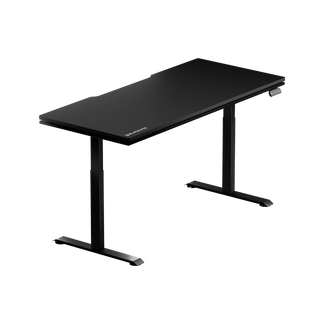
9. Compare Blacklyte Atlas Desk and Atlas Lite
Once you understand your requirements, compare individual products against the same criteria: desktop dimensions, height range, weight capacity, cable management, and additional features.
Blacklyte's Atlas Desk and Atlas Lite offer different combinations of size, adjustment range, and integrated features. They should not be treated as identical desks with different names.
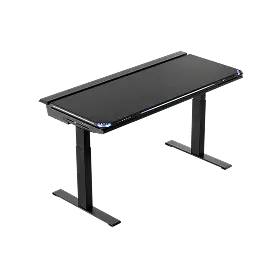
Blacklyte Atlas Desk
The Atlas Desk is suited to users who want an adjustable gaming desk with integrated lighting and additional desktop features.
Its listed specifications include:
- Desktop dimensions of approximately 59.1 × 27.6 inches.
- A three-stage leg design.
- A height range of approximately 28.3–53.9 inches.
- A stated maximum distributed load of 275.6 lb (125 kg).
- An integrated power supply column and cable management features.
- Integrated LED lighting.
These specifications describe the listed configuration. Review the current product page for the exact features, installation requirements, and specifications applicable to the model you intend to purchase.
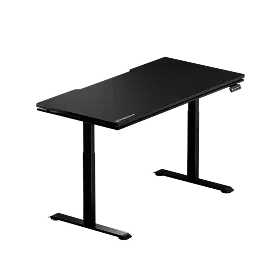
Blacklyte Atlas Lite Standing Desk
The Atlas Lite is an alternative for users who want to choose from different desktop sizes and use an electrically adjustable desk.
Listed desktop options include approximately:
- 47.2 × 31.5 inches.
- 55.1 × 31.5 inches.
- 63 × 31.5 inches.
- 70.9 × 31.5 inches.
The listed specifications include a two-stage leg design and a height range of approximately 27.6–46.1 inches. Maximum distributed load varies by size: the S/M configurations are listed at 220 lb (100 kg), while the L/XL configurations are listed at 265 lb (120 kg). Cable management is also part of the product design. Check the current listing for the features available with your chosen size and configuration.
Which Desk Should You Choose?
| Your Priority | What to Consider |
| A wider choice of desktop sizes | Compare the Atlas Lite size options against your available room and equipment dimensions. |
| A higher maximum desk setting | Compare the listed adjustment ranges of both models with your intended working heights. |
| Integrated lighting and additional desktop features | Review the Atlas Desk's listed integrated features. |
| A high equipment load | Compare the relevant size-specific weight capacity with your actual equipment weight. |
| A specific room layout | Measure your space and compare the complete desktop dimensions before choosing. |
Neither desk is automatically the right choice for every gaming setup. Compare the exact configuration, features, and dimensions against your needs before making a decision. For the latest details, refer to the Atlas Desk product page, Atlas Lite product page, and Blacklyte Desk comparison page.
Frequently Asked Questions
What size gaming desk should I buy?
Choose a size based on your available room, monitor dimensions, peripherals, and preferred layout. A single-monitor setup may need less desktop space than a multi-monitor workstation, but the right dimensions depend on the equipment and how you use it. Measure your setup before ordering.
Is a height-adjustable gaming desk worth it?
It can be worthwhile if you want to change desk height for different tasks or alternate between seated and standing positions. However, it is not essential for every user. Compare the adjustment range, stability, controls, and price with your actual requirements.
How much weight should a gaming desk support?
Add up the approximate weight of your monitors, monitor arms, PC, and other equipment. Then compare that total with the manufacturer's stated load capacity and any specified loading conditions. Do not rely on weight capacity alone to judge stability.
What makes a gaming desk stable?
Stability depends on factors such as frame design, leg construction, desktop dimensions, assembly, load distribution, and desk height. For an adjustable desk, look for evidence of how it performs at different heights rather than judging it only at its lowest setting.
Do I need cable management on a gaming desk?
Not every setup needs integrated cable management, but it can be useful if you have several monitors, powered accessories, or devices connected beneath the desktop. Cable trays, routing holes, and clips can help organise wires and make maintenance easier.
Is a gaming desk better than an office desk?
Neither category is automatically better. Compare the actual dimensions, construction, adjustment options, cable management, and price. A suitable office desk may meet your needs, while a gaming desk may offer features that better match your equipment or preferred setup.
What is the difference between Blacklyte Atlas Desk and Atlas Lite?
The models differ in desktop options, adjustment ranges, frame design, weight capacity, and integrated features. Check the current product listings and comparison page to determine which configuration better suits your room, equipment, and feature requirements.
Final Thoughts
Choosing a gaming desk is about finding the right balance between space, construction, usability, and features. Start by measuring your room and equipment, then compare desktop dimensions, weight capacity, adjustment range, and cable management.
Once you know what your setup requires, compare products against those criteria rather than paying extra for features you may not use. Explore the Blacklyte Atlas Desk and Atlas Lite to compare their specifications and find an option that fits your gaming space.


