











Reclining Desk Chairs: The Right Recline Angles for Work, Gaming, and Rest
You spent real money on a reclining desk chair. Now comes the question nobody warns you about: what angle should it actually be at? Most people either pin the backrest bolt upright at 90 degrees because it feels like the "correct" posture, or they crank it all the way back because it feels comfortable in the moment — and both extremes quietly work against them over a long session.
The truth is that recline angle is one of the most impactful adjustments on any ergonomic chair, and the right setting changes depending on what you're doing. The angle that keeps you locked in during a competitive FPS match is not the same one that protects your spine during an eight-hour work day, and neither of those is the right setting for an intentional recovery break between sessions. Each activity has an optimal zone — and understanding those zones is what separates a chair that merely reclines from one that actively works for you.
This guide breaks down the full recline range from 90° to 149°, maps each zone to specific activities, explains the biomechanical reasoning behind each recommendation, and shows you how to use your chair's tilt mechanism and lumbar system together for the best results.
Why Recline Angle Actually Matters
Recline isn't just a comfort feature — it's a load-management tool. When you sit at any angle, your spine is bearing a share of your upper body's weight. The steeper (more upright) the angle, the more that load falls directly onto your lumbar discs and the muscles supporting them. When you recline even slightly, the backrest begins to absorb a portion of that load, transferring it away from your spine.
Research presented at the Radiological Society of North America, using whole-body positional MRI, found that a reclined posture of around 135 degrees put measurably less strain on the lumbar discs than sitting upright at 90 degrees. The human body is simply not designed to hold a rigid static posture for hours at a time. Holding a strict 90-degree position requires constant, low-level muscular engagement — and over a two, four, or eight-hour session, that constant effort accumulates into the familiar afternoon stiffness and lower back fatigue that most desk workers and gamers know too well.
The good news is that the solution doesn't require reclining all the way back. A surprisingly small adjustment — shifting from 90° to 100° or 110° — can meaningfully decompress the spine, reduce muscular effort, and extend how long you can sit comfortably and productively. The key is knowing which angle to use and when.
The 90-Degree Myth: Why Upright Isn't Always Right
There's a deeply ingrained assumption that sitting perfectly upright at 90 degrees is the gold standard of good posture. Ergonomics research has been quietly dismantling this idea for years. Sitting bolt upright closes the hip angle, which flattens the natural lumbar curve, increases compressive force on the intervertebral discs, and requires the back muscles to work continuously with no rest. It's a mechanically demanding position that leaves no margin for the micro-movements your body needs to stay alert and comfortable.
This matters practically because it explains a behavior pattern that's almost universal among gamers and desk workers: the slow forward creep. You start a session sitting upright and within 45 minutes you've slumped forward, rounded your shoulders, and dropped your chin toward the screen. That forward drift isn't laziness — it's your body's instinctive attempt to find relief from the static load of the upright position. A properly reclined backrest addresses the root cause instead of fighting the symptom.
The goal is not to abandon upright posture entirely. The 90°–95° range still has its uses, particularly for very short, high-intensity bursts of focus. But as a fixed, all-day setting, it's one of the least ergonomic positions your chair can be in. For extended work and gaming, a slight recline is not a compromise — it's the correct setting.
The Recline Angle Guide: A Zone-by-Zone Breakdown
The recline range on a quality gaming and desk chair typically spans from 90° to around 149°. Rather than thinking of this as a single dial, it helps to think of it as five distinct zones, each suited to a specific type of activity and duration. Here's what each zone is doing for your body — and when to use it.
90°–100°: Maximum Control Mode
This is the most upright position on the range, and it has a narrow but legitimate use case: short bursts of high-intensity, precision-driven activity. Competitive FPS players and MOBA players who need maximum stability and the tightest possible arm control often gravitate to this zone during ranked matches. With your back nearly vertical, your core is engaged, your arms are positioned close to the keyboard, and your reaction loop is as tight as it gets.
The important caveat is duration. The 90°–100° zone is best reserved for focused, timed efforts — a competitive match, an intense sprint of coding, a focused writing session — rather than as an all-day default. Staying here for more than an hour or two without movement will begin to accumulate the spinal load and muscular fatigue that the upright position inherently creates. Use it intentionally and rotate out of it.
100°–110°: The Work and Productivity Sweet Spot
If you're looking for one angle to use as your default setting for desk work and active gaming, this is it. Ergonomic experts and clinicians consistently recommend the 100°–110° range as the optimal zone for sustained desk-based activity. At this angle, the backrest is angled slightly back, your forearms can rest naturally, and your eyes maintain a comfortable line of sight to your monitor without straining your neck. It reduces disc pressure meaningfully compared to sitting upright, without pulling you so far back that precise control suffers.
For remote workers who spend eight or more hours at a desk before switching to gaming in the evening, this range is particularly valuable. A slight recline around 100°–110° reduces lower back pressure while keeping you productive during meetings, writing, coding, and long work sessions. It's also the right starting point for active gaming — keyboard-and-mouse play, strategy games, and any competitive title where you need to stay sharp without straining.
110°–120°: Casual Gaming and Creative Thinking
Once you move past 110 degrees, you enter territory that suits a different kind of mental mode. This range works well for casual gaming, story-driven titles, video calls, and the kind of relaxed creative thinking that benefits from slightly reduced physical tension. Research suggests that as the recline angle opens past 110 degrees, the body begins to shift more weight onto the backrest, reducing both disc pressure and active muscle engagement — which, for lower-stakes activities, is exactly what you want.
The 110°–120° zone is also a natural transition point between focused work and deliberate rest. If you're reviewing footage, watching a stream, participating in a video call, or brainstorming without needing your hands on the keyboard, this angle keeps you comfortable and mentally present without pushing you into a fully passive reclined state. It's a particularly useful setting for the period between intensive sessions, when your body needs a partial break but you're not quite ready to step away entirely.
120°–135°: Active Recovery and Controller Sessions
The 120°–135° range is widely cited in ergonomic literature as the point where spinal loading is most significantly reduced. At this angle, the chair's backrest takes on a larger portion of your upper body weight, decompressing the lumbar spine and allowing the muscles supporting it to genuinely rest. Blood circulation to the lower limbs also improves, reducing the compression of soft tissue and the internal fatigue that contributes to the familiar heavy-leg feeling after long desk sessions.
This zone is ideal for controller gaming — console titles, racing games, fighting games — where you don't need to maintain tight keyboard and mouse precision. It's also the right setting for reading, watching longer video content, or taking a deliberate recovery break between high-intensity gaming or work sessions. Rather than getting up and breaking your flow entirely, reclining into this zone for 10 to 15 minutes allows your spine to decompress and your muscles to recover without losing the context of what you were doing.
135°–149°: Deep Rest and Intentional Breaks
The deepest end of the recline range is designed for intentional rest rather than active use. At 135° and beyond, you're no longer in a productive work or gaming posture — your head needs the headrest for support, reaching the keyboard becomes impractical, and the mental mode shifts toward passive recovery. That's not a flaw; it's the purpose. Using the full recline range for short rest periods, meditation breaks, or post-session decompression is a legitimate ergonomic strategy for managing fatigue over long days.
The important thing to understand about this zone is that it requires your headrest to be properly positioned. At shallow recline angles, the headrest is a nice-to-have. At 135°–149°, it becomes essential for keeping your cervical spine supported and preventing neck strain. A chair with a well-engineered adjustable headrest transforms this zone from a novelty into a genuinely useful recovery tool. For most users, 135°–149° is more than sufficient — chairs that advertise a 180° flat recline are primarily a marketing feature, and the vast majority of users will rarely if ever use the extreme end of that range.
Rocking Mode: The Underrated Ergonomic Tool
Most conversations about chair recline focus exclusively on locking the backrest at a fixed angle — but the rocking (or tilt) mode on a quality chair is just as important. When rocking mode is engaged, the backrest floats freely within a limited arc, allowing your body to make natural micro-movements as you breathe, shift position, and reach across your desk. This constant gentle motion keeps the spinal structures active and prevents the static load buildup that comes from holding any single posture for too long.
Think of rocking mode as a passive ergonomic system running in the background. During a long work session or a multi-hour gaming grind, keeping the tilt engaged at a moderate tilt tension lets your chair absorb and respond to your natural body movements rather than locking you into a single rigid position. The tilt tension adjustment allows you to dial in how much resistance the backrest offers — lighter for relaxed sessions, firmer for focused work where you want more stability without fully locking the chair in place.
The practical advice is simple: for deep-focus work and competitive gaming, lock the backrest at your preferred angle for stability. For everything else — casual use, long work days, creative sessions, video calls — consider leaving rocking mode engaged at a moderate tension and letting the chair adapt to you rather than the other way around.
Lumbar Support and Recline: Why They Work Together
Recline angle and lumbar support are not independent settings. They interact directly, and optimizing one without the other leaves a significant amount of ergonomic benefit on the table. Here's the core principle: as you recline, the contact point between your lower back and the chair's lumbar support shifts. A lumbar system that was perfectly positioned at 90° may gap away from your lower back at 110°, or press too aggressively at a different angle. Getting these two adjustments dialed in together is what separates a chair that feels good for an hour from one that supports you through an entire day.
This is particularly relevant when comparing different lumbar designs. Some chairs offer a built-in lumbar with separate height and depth adjustment — allowing you to raise or lower the support point and control how far it projects into your lower back independently. Other designs use a floating lumbar that settles into position against your lower back and then locks in place, leaving only fine front-to-back tuning to manage. Neither approach is universally superior; the right choice depends on whether you tend to stay at one angle or actively shift throughout the day.
For anyone who regularly cycles through multiple recline zones during a session — starting at 100° for focused work, shifting to 120° for a break, and returning to active posture — a lumbar system that is quick to re-tune makes those transitions far smoother than one that needs a full readjustment every time you change angles. This is one of the details that separates purpose-built ergonomic gaming chairs from generic office chairs that happen to recline.
Reclining Done Right: The Kraken Pro and Athena Pro
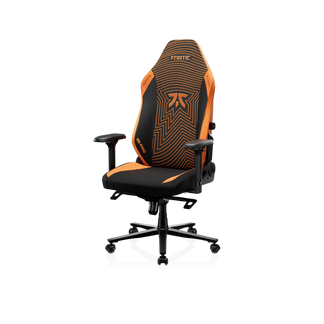
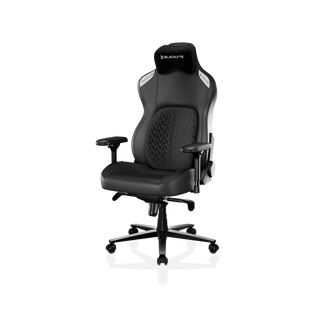
Both the Kraken Pro and the Athena Pro are built around the same core recline specification: a 90°–149° backrest range and a 0°–14° rocking mode, operated through a frog-type tilt mechanism with adjustable tilt tension. That range covers every zone in this guide — from the tight upright control position for competitive play through to the deep recovery recline — and the backrest locks at your chosen angle within that range, while the frog mechanism's tilt can be locked or left free to rock with adjustable resistance. Both chairs are elevated on an aluminum-alloy base and powered by a Class 4 hydraulic gas piston for smooth, reliable height adjustment.
Where the two chairs differ is in their lumbar support approach, which matters when you're thinking about how you'll use recline across the full range. The Kraken Pro features the Dynamic Air Lumbar Support System — a floating lumbar unit that settles into position against your lower back and then locks in place once fine-tuned front to back. The Athena Pro uses a built-in 4-Way Adjustment lumbar with both height and depth control, so you can dial in the exact vertical position and projection independently. If you tend to move through multiple recline zones during a session and want precise manual control over lumbar positioning, the Athena Pro's independent height adjustment gives you more granular options. If you prefer a lumbar that finds its own position and then locks, with only front-to-back fine-tuning to manage, the Kraken Pro's floating system suits that style.
On the seating surface, the Kraken Pro uses high-density memory foam, while the Athena Pro features upgraded dual-layer memory foam — an ultra-soft memory foam layer over a high-density polyurethane core infused with carbon and silver ions — for a noticeably softer initial feel that still retains its support over long sessions. Both chairs come with 4D armrests across the lineup, allowing you to position your arms correctly whether you're locked in at 95° for a competitive session or reclined at 120° for a longer, more relaxed play period. The Kraken Pro comes in DuraGen™ Leatherette; the Athena Pro is available in either FlexKnit™ Fabric or DuraGen™ Leatherette. You can compare both chairs side by side on the Blacklyte site, or visit the Ergonomics page and Gaming Hub for deeper guidance on posture for work and play.
Quick-Reference: Recline Angles at a Glance
If you want a fast reference before you sit down, here's how the full range maps to common activities:
- 90°–100° — Competitive gaming (FPS, MOBA), intensive short-burst focus work. Use intentionally; rotate out after an hour.
- 100°–110° — Sustained desk work, active gaming, keyboard-and-mouse sessions. Best all-day default setting for most users.
- 110°–120° — Casual gaming, story-driven titles, video calls, creative thinking, passive media. Good transition zone between work and rest.
- 120°–135° — Controller gaming, reading, deliberate recovery breaks, watching longer content. Active spinal decompression zone.
- 135°–149° — Short intentional rest periods, post-session decompression. Headrest engagement required. Not suited for active desk use.
One last practical note: no single angle is the answer for an entire session. The most effective ergonomic strategy is a dynamic one — cycling through the 100°–120° range throughout your work day or gaming session, using the deeper zones deliberately for recovery, and reserving the upright 90°–100° zone for the focused bursts where control matters most. Your chair's recline mechanism is not a set-it-and-forget-it feature. It's an active tool — and using the full range intentionally is what gets the most out of it. For more on building a fully ergonomic setup, explore the complete Blacklyte gaming chair lineup or browse all products including height-adjustable desks and accessories.
Frequently Asked Questions
What is the best recline angle for a desk chair?
For most people doing sustained desk work, a recline of 100°–110° is the ergonomic sweet spot. It reduces lumbar disc pressure compared to sitting upright at 90° while keeping your arms and eyes in a practical position for typing and screen work. If you're on a call or doing less hands-on work, 110°–120° is a comfortable and productive alternative.
What recline angle is best for gaming?
It depends on the type of gaming. For competitive, precision-driven titles (FPS, MOBA), staying in the 90°–100° range gives maximum control. For active keyboard-and-mouse gaming across longer sessions, 100°–110° is the better default. For casual or controller-based play, 110°–130° is comfortable and still fully supportive.
Is a 90-degree chair angle bad for your back?
As a brief position for focused tasks, 90° is fine. As an all-day fixed posture, it places significant compressive load on the lumbar spine and requires constant muscular effort to maintain. Most ergonomic experts recommend moving away from 90° for anything longer than short focused bursts, treating a slight recline of 100°–110° as the healthier default.
Should I lock my chair recline or leave it free to rock?
Both have their place. Locking the backrest gives you stability for precision tasks and competitive gaming. Leaving the tilt free with moderate tension allows natural micro-movements that reduce static spinal load over long sessions. Many users find that locking during focused work and unlocking during lighter or longer activity periods gives the best of both. Tilt tension adjustment lets you fine-tune how much resistance the free-rocking motion provides.
Do I need to adjust lumbar support when I change recline angles?
Ideally, yes — particularly if you're making large transitions (such as from 100° to 130°). As your recline changes, the contact point between your lower back and the lumbar system shifts. A chair with multi-way lumbar adjustment allows you to reposition the support to match your new angle, ensuring the lower back stays supported rather than the lumbar pressing into the wrong area or losing contact entirely.
Recline angle is one of the most functional — and most misused — adjustments on any reclining desk chair. The 90-degree default that most people never change isn't the ergonomic standard it appears to be; it's actually one of the harder positions on your spine for extended sessions. The real performance zone for most work and gaming sits between 100° and 120°, with the deeper range reserved for deliberate recovery and the upright range kept for short, high-intensity bursts where control is the priority.
Understanding the full range — and actively cycling through it rather than setting and forgetting — is what makes an ergonomic chair earn its price. A chair with a well-engineered recline mechanism, responsive tilt tension, and a lumbar system that works in coordination with your recline angle can meaningfully reduce fatigue, protect your spine over years of long sessions, and help you perform and feel better across everything you do at your desk. The angles are the tool. How deliberately you use them is what makes the difference.
Ready to Find Your Perfect Setup?
Explore the Kraken Pro and Athena Pro gaming chairs, or compare them side by side. Have a question about which chair fits your setup? Contact us — we're here to help.


